Examples to try
On this page
How to use the Creepy Text Generator
- Type or paste your text in the box.
- Every style updates as you type.
- Tap Copy next to the one you like and paste it anywhere.
About Creepy text
Where cursed text explodes in every direction, creepy text works with one direction at a time. Marks below the letters look like dripping ink or blood, marks above look like rising smoke, and a few mid-line marks look like a bad signal. That restraint keeps the words readable, which works better for usernames and titles.
The gothic dripping style mixes blackletter with drips, a classic horror poster look. Like all combining marks, the effect depends on the app, so some fonts show the marks more neatly than others.
Popular uses
- Horror story titles and creepypasta posts
- Spooky Halloween usernames
- Scary captions for TikTok edits
- Escape room and game invitations
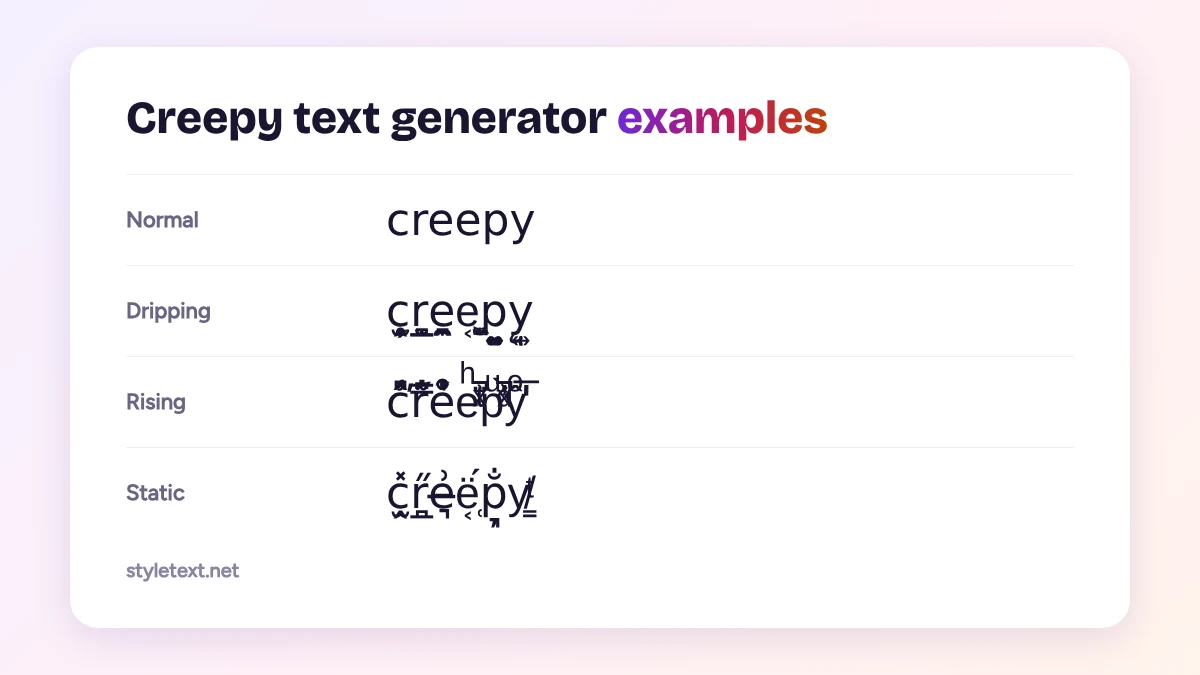
The creepy text styles
Every creepy text style is built from normal letters plus Unicode combining marks, the same kind of marks used in letters like é or ñ. The creepy text generator only adds them in one direction at a time, so the words stay readable:
- Dripping: marks hang below each letter, like ink or blood running down.
- Rising: marks float above each letter, like smoke or a ghost leaving the words.
- Static: a few marks above, through and below, like a bad TV signal.
- Gothic dripping: blackletter with drips, the classic horror movie poster look.
Where creepy text works
Creepy text works in most apps that accept normal text, including Discord, Instagram captions, TikTok comments, YouTube titles and text messages. Each mark counts as a character, so a creepy name can reach a username length limit faster than you expect. A few sites remove combining marks, and the text then shows up plain.
Ideas for creepy text
- Horror stories: a dripping title or the last line of a creepypasta.
- Halloween: party invitations, costume captions and spooky usernames.
- Games: escape room clues, villain names and haunted house signs.
- Videos: a scary caption on a TikTok or YouTube Shorts edit.
Creepy text vs. scary fonts
A scary font that you download, like a dripping horror typeface, only shows up on devices that have it installed, so it works in design apps such as Canva or Photoshop but not in a chat or a bio. The creepy text generator works differently: it makes real characters, so anyone who reads your message sees the same drips and marks without installing anything. Use downloaded fonts for posters and thumbnails, and copy-and-paste creepy text for usernames, comments and captions.
Tips for using creepy text
Keep creepy text short. A single dripping word next to normal text is scarier than a whole paragraph you cannot read. Screen readers read the marks out one by one or skip them, so do not put important information in creepy text. If you want more chaos, the cursed text generator stacks marks in every direction, and the gothic font generator gives you blackletter without the drips.
Frequently asked questions
How is creepy text different from cursed text?
Creepy text adds marks in one direction (dripping, rising or static), so it stays readable. Cursed text stacks marks everywhere.
Is this a scary font generator too?
Yes. Scary font, spooky font and horror text generators make these same effects.
Can I make it less creepy?
Try the static style, which only adds a few marks per letter.
Will it work in Instagram captions?
Yes. Instagram shows combining marks in captions and bios.